 Nitidea
Video enhancement
Enhance your videos on your PC: sharper, cleaner, in colour
Old home movies, camcorder tapes, phone clips shot in dim light: Nitidea enlarges them up to 4K, removes their noise, colours black-and-white film and steadies its flicker, frame by frame, with artificial intelligence on your own Windows PC. The video is never uploaded anywhere, and the original file is never changed.
Every Pro feature, no payment details. During the trial, enhanced videos carry a small watermark.
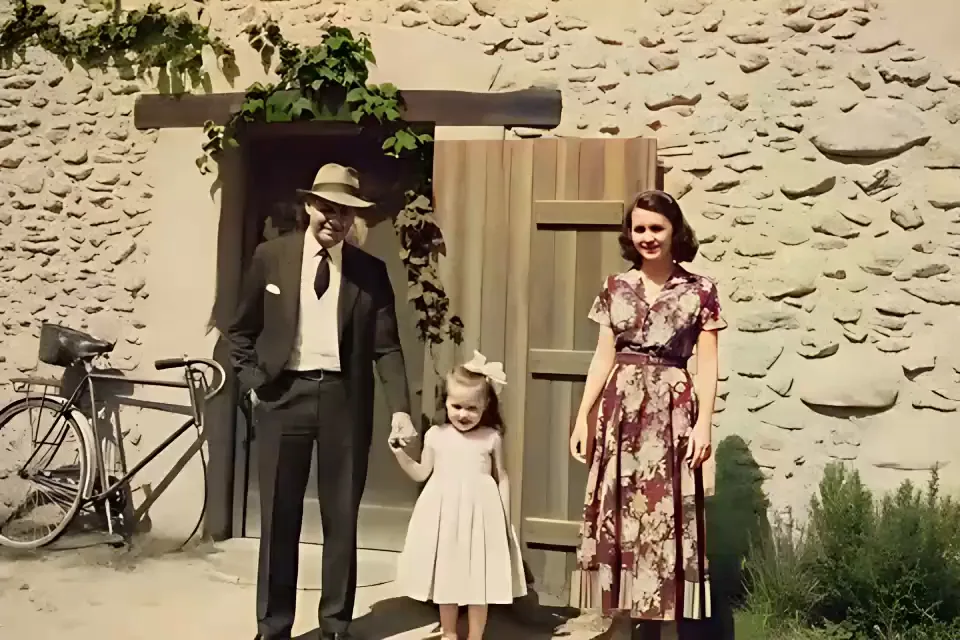 BeforeAfter

A sample clip made from a picture created with AI, turned black and white with grain and flicker added on purpose, then enhanced by Nitidea: Old film, with Add colour, Steadier light and Enlarge too 2 times. The colours are a likely guess. Drag the line.
What Nitidea does to a video
Enlarges up to 4K
Bigger, 2 times or 4 times: a 720p clip becomes Full HD or more, a Full HD one becomes 4K, with detail rebuilt frame by frame instead of blur.
Removes the noise
Sharper, It’s grainy: the grain of a video shot in dim light goes away at the same size. Each frame is cleaned by looking at the ones around it, so the picture stays steady.
Colours black-and-white film
Old film, Add colour: a black-and-white or faded film gets its colours, carried from one frame to the next so they do not flicker. A likely guess, not the real colours.
Steadies old film
Steadier light evens out the flicker of old film. Smoother motion makes the frames it lacks, so movement flows instead of jerking.
Keeps the sound
The result is an MP4 that plays everywhere, with the original sound. Videos from phones, cameras and camcorders are turned upright and made progressive by themselves.
Only the part you need
Trim… keeps one part of the video, or ten seconds to try your choices first: a shorter video takes less time.
How to enhance a video, step by step
- 1Drag the video into Nitidea, like a photo. MP4, MOV, AVI, MKV, WMV, MPG and camcorder files (MTS, M2TS, VOB, DV) all open.
- 2To try it on a short piece first, click Trim… under the picture: keep the part you want, or ten seconds.
- 3On the right, choose Sharper (It’s grainy, for the grain of dim light) or Bigger, 2 times or 4 times.
- 4For an old film, choose Old film instead: Add colour, Steadier light (old film) or Smoother motion, and Enlarge too if you want it bigger.
- 5Under Enhance, Nitidea says how long the video will take on your PC: it measures one frame first.
- 6Press Enhance. The result is a new MP4, shown before and after on a frame of the saved video; the original is never changed.
Why on your PC
Family videos stay at home
Online video enhancers want your videos on their servers, and bill by the minute. Nitidea does all the work on your PC: no video leaves it.
No subscription, no minutes to buy
Pro costs 19 € + VAT once, with 12 months of updates; the version you have works forever, on 2 PCs, for as many videos as you like.
No account, works offline
Nothing to sign up for, and once installed Nitidea needs no internet connection to enhance a video.
Try a piece before you wait
Trim… keeps ten seconds: enhance them, look, and decide before the long part starts. Nitidea says how long it will take before you press Enhance.
What to expect
- A video is slow: every frame is a photo. With a recent graphics card a minute of video takes from a few minutes to half an hour or more, by its size; Nitidea measures your PC and says the expected time before you start.
- Without a graphics card a minute of video takes hours. Try a few seconds first with Trim…, or use a PC with a graphics card.
- Videos are always enhanced at Fast quality: the others would need hours per minute even with a graphics card. Results are at most 4K.
- The colours are a likely guess by the AI, not the real ones. Scratch removal is for photos: on film it is not offered.
- An HDR video from a phone is saved as a standard one, so it plays everywhere. The result is always MP4.
Questions
Is video enhancement free?
Videos are part of Nitidea Pro (19 € once). You can try them free for 14 days with every Pro feature; during the trial, enhanced videos carry a small watermark. For photos, Sharper and Bigger up to 2 times are free, with no watermark.
Are my videos uploaded?
No. Everything happens on your PC, and the app sends nothing about your videos.
How long does a video take?
It depends on the graphics card and on the size. As a guide, with a mid-range graphics card a minute of 720p video enlarged 2× takes about ten minutes, and a minute of Full HD enlarged to 4K about twenty. Before you start, Nitidea says the time expected on your PC, under Enhance.
Which videos can I open?
MP4, MOV, M4V, AVI, MKV, WMV, MPG, WebM, 3GP and the files of camcorders and DVDs (MTS, M2TS, VOB, DV). The result is an MP4 with the original sound.
Does it work on Super 8 or VHS transfers?
Yes, once they are a video file. Under Old film, Steadier light is made for the flicker of old film, Smoother motion for film transferred with repeated frames or at fewer than 20 frames a second, and Add colour for black and white.
Bring an old video back
Download Nitidea and ask for a trial key: every Pro feature, on your own videos and photos, for 14 days, with no payment details.